How to Remove Ink and Adhesive in Cozy Game Restoration
Marker and sticker glue come off with solvent and the heat gun. The order matters, the gun needs a full five seconds, and a dry pass is not a clean one.
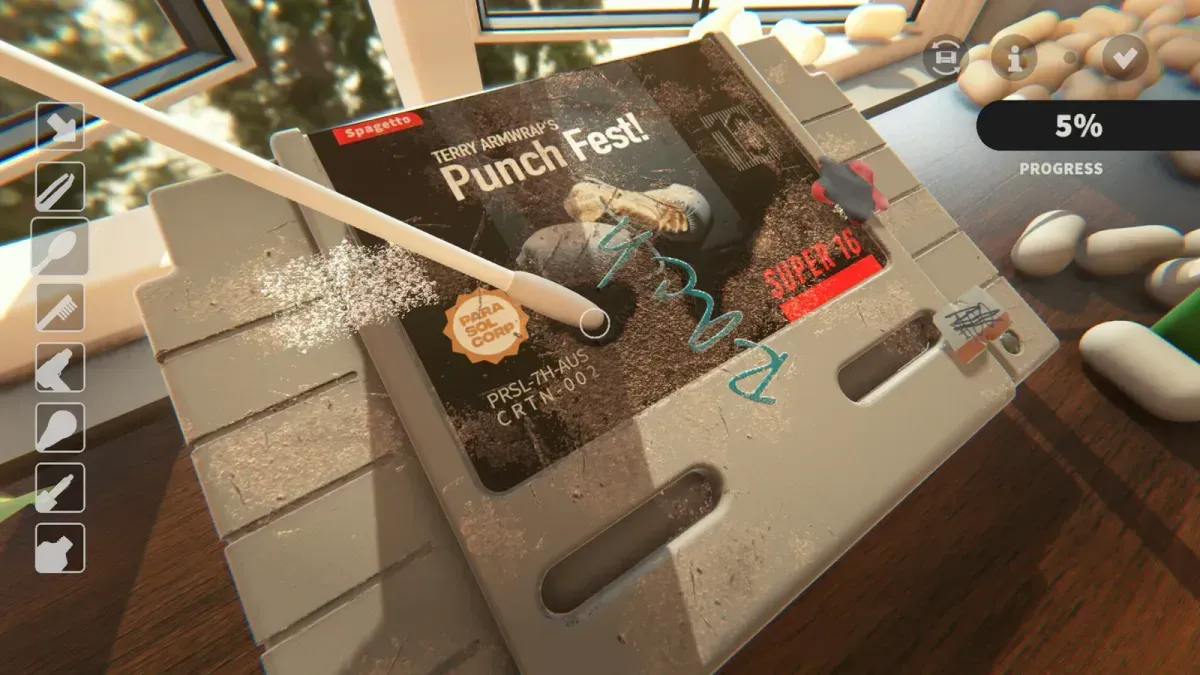
What removes ink and adhesive residue?
Solvent, followed by the heat gun. The solvent breaks the mark down, the swab lifts it, and the gun dries the wet patch. Dust tools do nothing to either, and polishing over either one just spreads it.
Ink and adhesive are grouped into a single bar on the finish screen — Ink & Adhesive — which is worth knowing because it means a cartridge can look spotless and still be short on that bar with no visible culprit.
One case was not a tool problem: on disc cartridges the adhesive sometimes never spawned after a sticker was removed, so there was genuinely nothing on the label to dissolve. Patch 1 fixed it on 6 November, and the patch has been live since 7 November — adhesive not spawning on discs has the check for a cart that still behaves that way.
How do I apply the solvent?
Pick the solvent from the tool bar, aim the squeeze bulb at the mark, and give it a squeeze. It applies in small amounts with an audible click, and the mark needs a moment before it starts to give.
Three rules that cut the wasted effort:
- Small amounts, several times. Flooding a label with solvent does not speed it up and it leaves more to dry.
- Apply, then work. Give the mark a beat before the swab, or you are wiping solvent off the surface before it has done anything.
- Swab, then check. The swab picks up the dissolved ink; a swab already loaded with ink deposits it back onto the label.
Marker scribbles on the shell behave slightly differently from a faint price mark on paper: the shell line comes off in a few passes, the label needs patience because the ink has soaked in and the paper will not tolerate aggressive work.
Why does the heat gun step keep failing?
Because the game is checking for a sustained pass, not a swipe. The gun runs a five-second timer to register use, and a pass shorter than that does not count. That is why the same action that visibly dries the surface can leave the objective unticked.
The fix is simple: hold the gun on the wet patch and count to five before moving on. If the objective still refuses, the failure is usually order rather than duration — the tutorial expects the solvent step before the drying step, and doing them out of sequence can leave the event unfired. There is a dedicated walkthrough for that case on heat gun step not completing.
Is drying actually necessary?
Yes, twice over. Wet solvent keeps the layer from registering as finished, and it also affects how the surface reads under the UV torch — a wet patch glows, which sends you back to look for a stain that is not there any more.
Dry until the patch stops shining. On a large solvent area that is two or three full passes, not one.
What about discoloration?
Discoloration is the odd layer out. It is not a mark sitting on the surface, it is the plastic itself having yellowed, and it responds to coverage rather than to a single dissolved spot. It shares the finishing bar with ink and adhesive, which is why that bar moves slowly on an old cart even when the visible marks are gone.
The honest answer for a beginner: if the ink bar stalls with nothing visible left, run the UV torch and check whether you are actually looking at discoloration. The layer breakdown is on damage types.
How do I stop making it worse?
Work from the edge of the mark inward, keep the swab clean, and stop when the bar stops moving. Solvent that is spread across a label takes the ink with it, and a label that has been over-worked starts to lift along its edge — a condition problem that cleaning cannot undo.
If a mark refuses to shift after several solvent passes, the tool power is the likely ceiling. Tools inherit cleaning power from the shelf, so shelving genre stacks is the fix rather than more scrubbing: rarity and shelf bonuses explains the mechanism, and cleaning tools lists the full bar.
Related Articles
guides
Autocomplete Not Working at 99 Percent in Cozy Game Restoration
Autocomplete fires only when every layer passes 99 percent, so one bar at 98 keeps the cartridge open. How to find the layer that is holding it back.
guides
Adhesive Not Spawning on Discs: Cozy Game Restoration Bug
Disc cartridges could refuse to spawn sticker adhesive, leaving the ink bar unfillable. Fixed in Patch 1 and live again since 7 November.
guides
Packing Peanuts and the Bin in Cozy Game Restoration
The bin eats peanuts and stickers, peanuts are worth a little money, and the tweezers keep grabbing them by accident. What the desk clutter is for.
Was this helpful?
Thanks for the feedback!