How to Clean Dust and Dirt in Cozy Game Restoration
Why the swab smears instead of cleaning, how the toothbrush handles grooves, and when to wipe the tool on the wet pad before you touch the label.
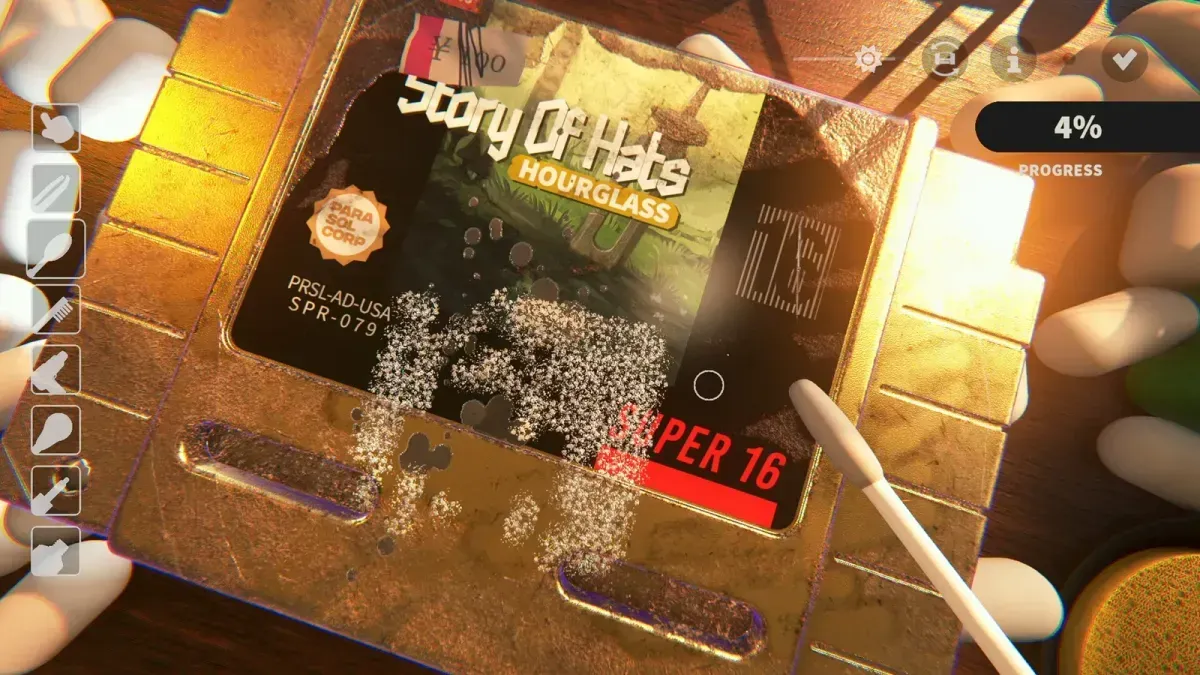
Which tool removes dust and dirt?
The cotton swab is the primary tool and the fastest for flat shell and label surfaces. The toothbrush is for grooves, ridges and edges, where a swab head cannot reach. Neither one needs a second tool to finish the layer — they need cleaning.
Dust is the first layer in the intended order, and clearing it is what makes the layers underneath visible. Sweeping with the UV torch before and after the dust pass gives you a number for how much is left, which is more reliable than the way the plastic looks under one lamp.
Why does the swab stop cleaning and start smearing?
Because it is full. The swab and the toothbrush accumulate the grime they lift, and once they are loaded they deposit it back on the surface instead of removing it. The wet pad on the desk cleans the tool, and the game does not prompt you to use it.
The tell is specific:
- The dirt percentage stops climbing even though you are moving the tool.
- A patch you just cleaned turns grey again.
- A dark streak follows the tool instead of disappearing under it.
All three mean pad, not more scrubbing. On a heavily soiled cart this happens two or three times, and on a nearly clean one it happens at the worst moment — right at the end, which is why finishing feels impossible when it is not.
Where should I clean first?
Flat surfaces first, then edges, then grooves. Working in that order does two things: it stops loose dust from being pushed into the seams, and it keeps the swab cleaner for the surfaces that show.
On a cartridge the order is roughly:
- The large flat face of the shell.
- The label, worked from the centre outward.
- The chamfered edges.
- The seams and the grooves along the moulding.
- The back, including the screw recesses.
Discs are quicker: the readable face and the hub take most of the dust, and the case edges take the rest. Cartridges with deep mouldings — the Galaxis 16 shells in particular — are where the toothbrush earns its place.
When should I switch from the swab to the toothbrush?
When the dirt is inside a groove rather than on a surface. The swab head is wide: pressed into a groove it rides the ridges and leaves the dirt in the channel. The toothbrush bristles get down into the channel, which is slower over a large flat area but faster where the swab cannot reach at all.
Practical split: swab for the face and label, toothbrush for everything that catches a fingernail. If you find yourself scrubbing the same line for ten seconds with no movement in the dirt bar, you are using the wrong tool, not the wrong pressure.
Does pressure help?
No. Pressing harder does not remove more dirt, and on labels it risks working the surface until it lifts. Surfaces stretch, smear and lift as you work — the store description is explicit about it — so a light, repeated pass beats a hard one.
The other lever is camera angle. Dirt hides at the edge of the model, and a low camera turns a groove into a flat wall you cannot see into. Before deciding a patch is impossible, orbit the cart and look again.
What if a patch stays dirty no matter what?
Two possibilities, in order of likelihood. The tool is dirty, or the patch is not dust. Ink, adhesive residue and discoloration all sit under the dust layer and need their own tool, and they look like stubborn dirt until you solvent them.
Run the UV torch over the spot. If it glows, it is still a layer you can remove; the colour and the stat readout tell you which one. The full layer list is on damage types, ink and residue specifically on ink and adhesive, and the tool roster on cleaning tools.
Related Articles
guides
Autocomplete Not Working at 99 Percent in Cozy Game Restoration
Autocomplete fires only when every layer passes 99 percent, so one bar at 98 keeps the cartridge open. How to find the layer that is holding it back.
guides
Adhesive Not Spawning on Discs: Cozy Game Restoration Bug
Disc cartridges could refuse to spawn sticker adhesive, leaving the ink bar unfillable. Fixed in Patch 1 and live again since 7 November.
guides
Packing Peanuts and the Bin in Cozy Game Restoration
The bin eats peanuts and stickers, peanuts are worth a little money, and the tweezers keep grabbing them by accident. What the desk clutter is for.
Was this helpful?
Thanks for the feedback!